Claude Code Changed How I Build Things (And I'm Not a Developer)
How a non-developer used Claude Code to build image pipelines, video compositions, website redesigns, and automation scripts. The mental model shift that makes it work.
April 14, 2026

The Problem: You Know What You Need, But You Can’t Build It
Every leader I work with has the same frustration. You know exactly what would save you time — a script that formats your weekly report, a pipeline that produces consistent social images, a tool that processes the same spreadsheet you manually wrangle every month. You can describe it perfectly. You just can’t build it.
So you do it manually. Or you hire someone. Or you spend a weekend learning a tool that does 80% of what you need and none of the 20% that actually matters.
I was in the same position. I’m not a developer. I’m a school leader turned AI consultant. I needed to produce branded content at scale — blog images, video compositions, website updates — and I didn’t have a team to delegate to or a budget to outsource.
Claude Code changed that equation completely. In one month, I built:
- An image generation pipeline that produces branded featured images in under 10 minutes each
- 30 video compositions with 3D animations and professional motion design
- A complete website redesign
- Deployment workflows that take three terminal commands instead of an hour of clicking
None of this required me to understand React, Node.js, or APIs at a technical level. I described what I needed. Claude Code built it.
What Claude Code Actually Is (And Why It’s Different From ChatGPT)
Claude Code is not a chatbot. It’s an AI agent that runs in your terminal — the command line on your computer. It reads your files, writes new ones, runs commands, checks the results, and iterates based on your feedback.
The difference from ChatGPT matters for one reason: speed of execution.
When you use ChatGPT to write code, the loop looks like this: ask → copy the code → paste into a file → run it → hit an error → go back to ChatGPT → paste the error → get a fix → paste it back → run again. That loop takes 5-10 minutes per iteration. Most people give up after two rounds.
With Claude Code, the loop is: describe what you want → it writes the file → it runs the file → it sees the error → it fixes the error → it runs again. You watch. When it works, you move on. The whole cycle takes under a minute.
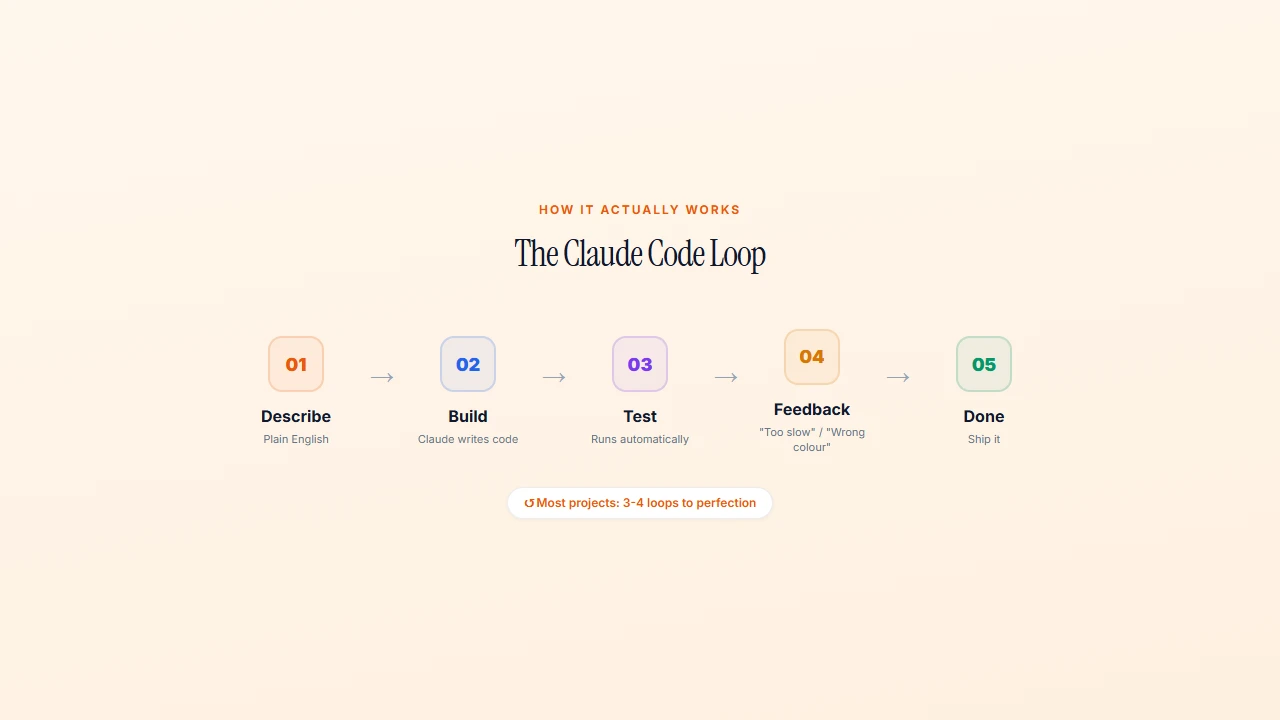
For a leader producing content, this is the difference between “I’ll get to it this weekend” and “it’s done before lunch.”
My First Real Project: From “I Need This” to “It’s Done” in 20 Minutes
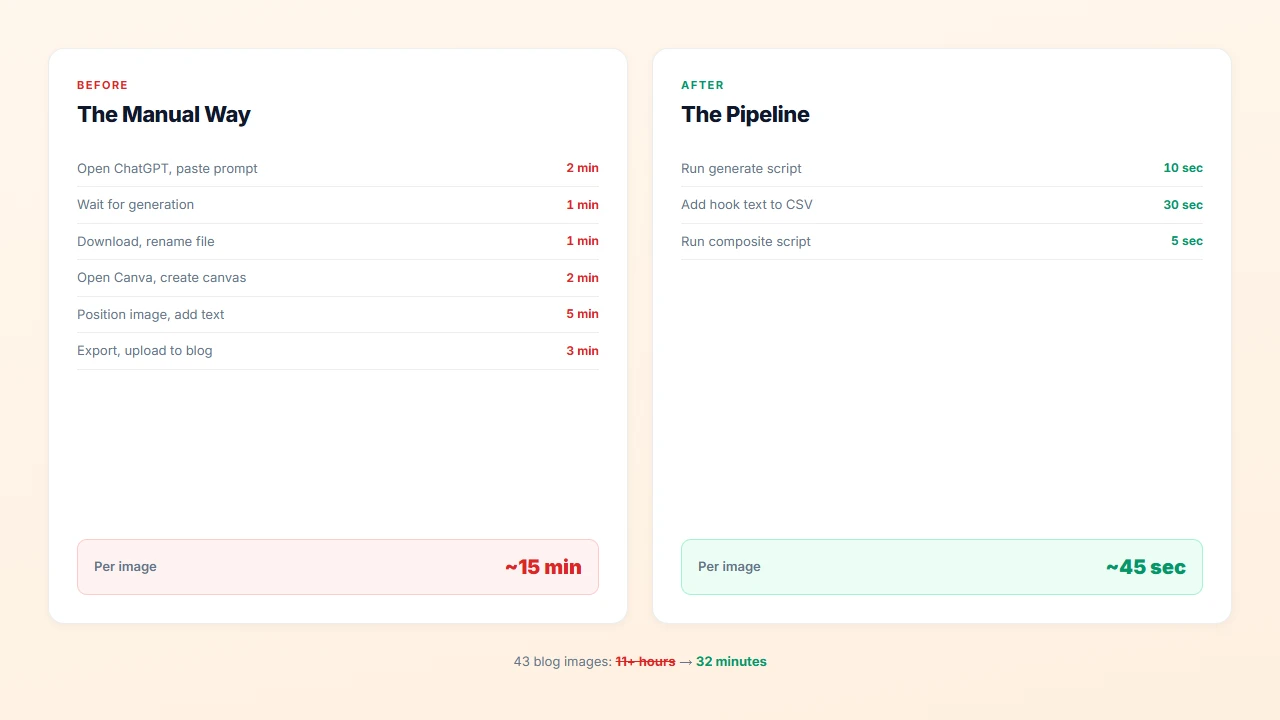
I needed to produce branded blog images. Forty-three of them. The manual process — generate in ChatGPT, download, open Canva, position, export, rename, upload — took 15-20 minutes per image. That’s 11+ hours of repetitive work.
So I described what I needed to Claude Code: “Write a Node.js script that takes a text prompt as a command line argument, sends it to the Google Imagen 4 API, and saves the resulting image to a file path I specify. The aspect ratio should always be 16:9.”
Claude Code wrote the script. I ran it. It worked on the first try. Fifty lines of JavaScript that I now use multiple times a week. Those 11 hours of manual Canva work became a 10-minute terminal command.
What I learned: specificity matters more than technical knowledge. I didn’t say “write me some code.” I said exactly what I wanted: the input (text prompt), the output (PNG file), the constraint (16:9), and the interface (command line arguments). The clearer you are about what you need, the less you need to know about how it gets built.
This is the skill leaders already have. You spend your days specifying outcomes, defining requirements, and evaluating results. That’s exactly the skill Claude Code rewards.
The Feedback Loop That Makes It Work
The real power of Claude Code isn’t the first generation. It’s the iteration.
Here’s how building a Remotion composition actually feels:
Me: “Create a video composition that shows a 3D floating dashboard with workflow stats. Navy background, orange accents, the dashboard should look like it’s floating in space with a slight perspective tilt.”
Claude Code: generates PerspectiveLaunch.tsx, opens Remotion Studio for preview
Me: “The dashboard is too flat. Add more perspective — like it’s tilted 15 degrees. And the cards inside should have subtle shadows to create depth.”
Claude Code: updates the transforms and shadow values
Me: “Better. But everything appears at once. I want the cards to stagger in — each one entering 6 frames after the previous one, with a spring animation.”
Claude Code: adds staggered spring entrances
Me: “That’s it. That’s exactly what I wanted.”
Four exchanges. Each one took under a minute. The total time from “I want a 3D dashboard” to a finished, production-quality video composition was about 15 minutes.
The key insight: feedback doesn’t require technical language. “Too flat,” “too slow,” “the colors are wrong,” “make it feel more premium” — Claude Code translates these into specific code changes. You’re the creative director. It’s the production team.
Project Memory: Teaching Claude Your Preferences
After rejecting three blog header approaches (one was “super bad,” another was “AI slop,” the third was “just a reskin of the default”), Claude Code started to understand what “premium” meant for KAIAK.
This happens through two mechanisms:
CLAUDE.md Files
A CLAUDE.md file lives in your project root and contains permanent instructions. Mine points to the knowledge graph, the brand guide, and key rules. Every time Claude Code starts a session, it reads this file first.
Memory Files
Claude Code maintains a memory directory with files about your preferences, your project context, and feedback you’ve given. When I said “I love 3D and premium styles, I hate flat counter layouts,” that became a memory file. Now Claude Code knows not to propose flat designs before I have to reject them.
This compounds over time. The more you work with Claude Code, the more context it accumulates. After a few weeks, it knows your brand colors, your animation preferences, your file naming conventions, and your tolerance for complexity. Starting a new session doesn’t mean starting from zero.
BRANDING.md
The most powerful “teaching” document is BRANDING.md — a 65KB file that defines every visual rule for the project. Colors, typography, animation timing, composition rules, what to avoid. Claude Code reads this before generating any visual component, and the output is immediately on-brand.
The lesson: the time you invest in documenting your preferences pays exponential returns. Write it down once, and every future interaction benefits.
What You Still Need to Know (It’s Less Than You Think)
You do not need to understand React to build Remotion compositions. You do not need to understand Node.js to build API scripts. You do not need to understand Next.js to modify your website.
Here’s what you actually need:
File system basics. Know what files and folders are. Know that src/components/ is where the component files live. Know that public/ is where static assets go. If you can navigate Windows Explorer or Finder, you have this.
Terminal basics. Know how to open a terminal, navigate to your project folder, and run a command like node script.js or npm run dev. Five commands are enough for 90% of the work.
Clear description skills. This is the actual skill. Being able to say “I want a 3D floating dashboard with navy background, orange accent cards, spring-based stagger animations, and a perspective tilt of about 15 degrees” is more valuable than knowing React.
An eye for quality. You need to know when something looks right and when it doesn’t. That’s not a technical skill — it’s taste. If you can look at a design and say “this feels flat” or “this looks premium,” you can direct Claude Code effectively.
The mental model shift: think of yourself as a creative director, not a coder. You set the vision, provide the feedback, and make the decisions. Claude Code handles the implementation.
Five Things You Could Stop Doing Manually This Week
These are real projects that take under an hour to build with Claude Code. Each one eliminates a recurring task you’re probably doing by hand right now.
1. The Weekly Report You Reformat Every Friday
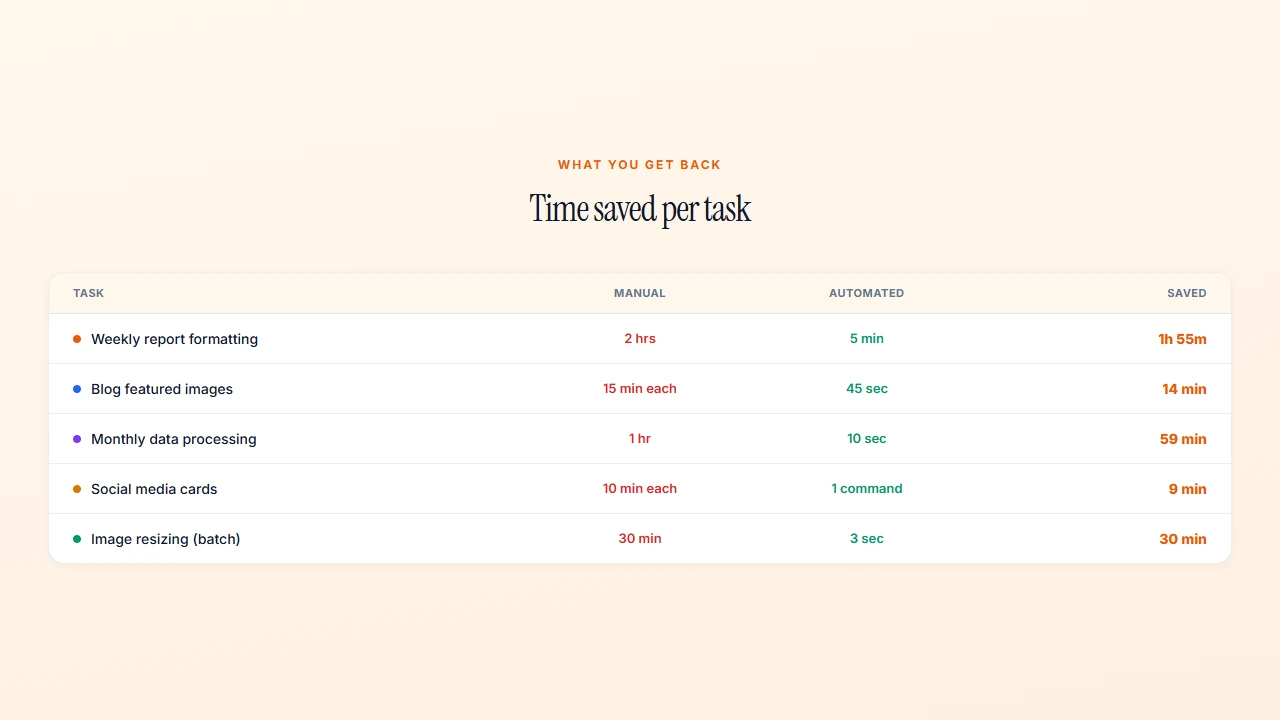
You pull data from the same three sources, paste it into the same template, adjust the same formatting. Describe the inputs and the output format to Claude Code. It writes a script that takes raw data and produces a formatted report in seconds. Time saved: 1-2 hours per week.
2. The Spreadsheet You Manually Process Every Month
Enrolment data. Financial summaries. Board metrics. Whatever CSV you download and manually wrangle into shape. Claude Code writes a script that does the same transformations automatically. Run it once a month, get clean data, move on. Time saved: 30-60 minutes per month.
3. The 50 Images You Resize One at a Time
Event photos for the newsletter. Social media crops. Thumbnails for your website. “Write a script that takes all images in a folder, resizes them to 1200px wide, converts to WebP, and saves them to an output folder.” One command, 100 images in seconds. Time saved: varies, but the annoyance saved is immeasurable.
4. The Social Media Posts You Design from Scratch
You open Canva, create a 1080x1080 canvas, pick a background, add text, fiddle with fonts, export. Every time. Claude Code can write a script that takes a quote and your brand colors and produces a consistent card. Same look every time, no design decisions. Time saved: 10-15 minutes per post.
5. The Content You Produce Inconsistently
Blog posts that look different every time. Newsletters with varying formats. Presentations that never quite match your brand. Claude Code can build templates, pipelines, and automation that enforce consistency without requiring discipline. The result: professional output at the pace of “good enough.”
Each project starts the same way: describe what you want, let Claude Code build it, test it, give feedback, iterate. The first one takes an hour. The tenth takes ten minutes.
Why This Matters for Leaders Specifically
The bottleneck for most leaders isn’t ideas. It’s execution. You know what content you should be producing. You know what processes you should be automating. You know what systems your team needs. You just don’t have the time, the budget, or the technical skills to build them.
Claude Code removes the technical barrier. Not by teaching you to code — by making coding unnecessary. You describe the outcome. It handles the implementation. You evaluate the result. It iterates until it’s right.
This changes the math on what’s worth building. That image pipeline I mentioned? A freelancer would have quoted me $2,000-3,000 and taken two weeks. I built it in an afternoon. The 30 video compositions? A motion design studio would have charged $500-1,000 each. I produced them in a week.
The tools won’t be as architecturally elegant as what a senior engineer would produce. But they work. They solve your specific problems. And they’re built around your exact workflow — not a generic template designed for someone else’s use case.
For leaders who need to get content out quickly and consistently, that’s the real shift. Not “anyone can code now.” More like: you can build exactly what you need, without waiting for anyone else to build it for you.
Frequently Asked Questions
Can you use Claude Code without knowing how to code?
Yes. You need four things, none of them programming: knowing what files and folders are, being able to open a terminal and run a command like npm run dev, describing what you want precisely, and having the taste to tell whether the result is any good. The skill that matters is specification, which most leaders already practice daily.
How is Claude Code different from ChatGPT?
ChatGPT hands you code to copy, paste, run, and debug yourself, which is a 5 to 10 minute loop per iteration. Claude Code is an agent in your terminal: it writes the file, runs it, reads the error, fixes it, and runs again while you watch. The whole cycle takes under a minute, which is the difference between “I’ll get to it this weekend” and “it’s done before lunch.”
What can a non-developer actually build with it?
Real, boring, useful things. A script that reformats your weekly report. A monthly spreadsheet transformation. Bulk image resizing and conversion. Branded social cards from a quote and your colors. Content templates that enforce consistency. Each of these takes under an hour to build the first time and about ten minutes once you have done a few.
Do I need to understand React or Node.js?
No. I have built Remotion video compositions without understanding React, API scripts without understanding Node.js, and website changes without understanding Next.js. Think of yourself as a creative director rather than a coder: you set the vision, give feedback, and make the decisions.
Is the code good enough to rely on?
It is not as architecturally elegant as what a senior engineer would write, and it does not need to be. It works, it solves your specific problem, and it is shaped around your actual workflow rather than a generic template. For an image pipeline a freelancer quoted at $2,000 to $3,000 over two weeks, an afternoon of building was the better trade.
If you’d rather have someone build these systems alongside you than figure it out alone, that’s exactly what my AI Systems Implementation program does — 6 weeks, done with you, and you own everything at the end.
Further reading

Want help building systems like this?
We help school leaders automate the chaos and get their time back.