I Built a Featured Image Pipeline With AI and Node.js — Here's the Whole System
How I automated blog featured images using Google Imagen 4, a Node.js compositing script, and a CSV file. The full pipeline that produces consistent, branded images in under 10 minutes each.
April 21, 2026
Why I Stopped Using Canva for Blog Headers
I had 43 blog posts with no visual consistency. Some had stock photos. Some had screenshots. Some had nothing at all. Every image looked like it came from a different blog.
I tried fixing this in Canva. The process went like this: generate an illustration in ChatGPT, download it, open Canva, create a 1280x720 canvas, drag the image in, add text, fiddle with positioning for 10 minutes, export as PNG, rename the file, upload to my site. Per image.
Multiply that by 43 and you have a weekend of mindless clicking.
I replaced the entire process with three terminal commands. The total time per image dropped from 15-20 minutes to under 10 — and every single image now looks like it belongs to the same brand.
The Three-Script Pipeline: Generate, Composite, Deploy
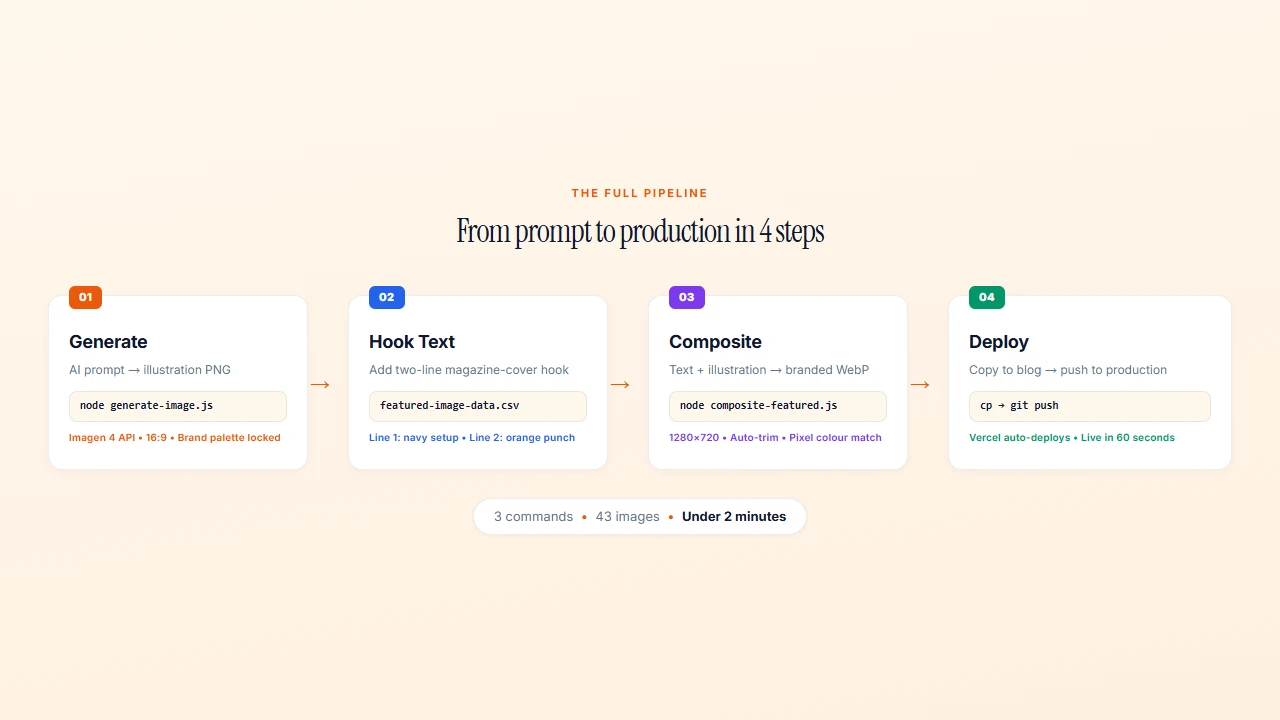
The system has three pieces:
- generate-image.js — Calls the Google Imagen 4 API with a text prompt, saves a PNG
- composite-featured.js — Reads a CSV of hook text, composites text + illustration into a branded 1280x720 WebP
- Copy to production — A file copy from the output folder to the live site’s public directory
That’s the whole thing. No Figma, no Canva, no drag-and-drop. Three commands in the terminal and you have a finished, branded featured image.
Writing Prompts That Produce Consistent Brand Images
This is where most people get AI image generation wrong. They write open-ended prompts and hope for the best. That produces beautiful images that look nothing like each other.
The fix is a standard prompt prefix that every image starts with:
Wide landscape editorial illustration. Plain flat warm cream background.
Illustration on RIGHT 55 percent. LEFT 40 percent empty cream.
NO TEXT. NO LETTERS. NO SYMBOLS.
Thick black outlines. Bold flat fills.
ONLY orange, terracotta, peach, cream, black. ZERO cool colors.
Every image I generate starts with this exact block. Then I add one or two sentences describing the specific visual for that post.
The constraint is the point. By locking the palette to warm tones only (oranges, terracottas, peach, cream, black), every image automatically looks like it belongs to the same brand. By forcing the illustration to the right side and leaving the left empty for text, the composition works every time without manual adjustment.
The “Never Use” List
I also maintain a list of visual cliches that AI loves to generate:
- No gears or cogs
- No lightbulbs
- No funnels
- No rockets
- No brains
- No graduation caps
- No question marks or speech bubbles
These are the clip-art of AI illustration. Every AI consultant’s blog uses them. Banning them forces the AI to think harder, and the results are more distinctive.
For people, the rule is: “abstract faceless silhouettes — circles and rectangles, no faces, no features.” This avoids the uncanny valley of AI-generated faces while keeping illustrations warm and human.
The Generate Script: 50 Lines of Node.js
The image generation script is surprisingly simple. It’s a single function that sends a prompt to Google’s Imagen 4 API and saves the result:
async function generateImage(prompt, outputPath) {
  const url = `https://generativelanguage.googleapis.com/v1beta/models/imagen-4.0-generate-001:predict?key=${API_KEY}`;

  const body = {
    instances: [{ prompt }],
    parameters: {
      sampleCount: 1,
      aspectRatio: "16:9",
    }
  };

  const response = await fetch(url, {
    method: 'POST',
    headers: { 'Content-Type': 'application/json' },
    body: JSON.stringify(body),
  });

  const data = await response.json();
  const imageData = data.predictions[0].bytesBase64Encoded;
  const buffer = Buffer.from(imageData, 'base64');
  fs.writeFileSync(outputPath, buffer);
}
You run it from the terminal:
node generate-image.js "Wide landscape editorial illustration..." "out/my-image.png"The API returns a base64-encoded image. The script decodes it and writes it to disk. The aspect ratio is locked to 16:9 in the parameters, so you never have to think about dimensions.
The whole script is 50 lines including error handling. Claude Code wrote the first version in about 5 minutes. I’ve barely touched it since.
The Compositing Script: SVG Text, Color Matching, and Auto-Trim
This is where it gets interesting. The compositing script takes three inputs:
- A hook text line (navy, bold)
- A highlight text line (orange, italic)
- The illustration PNG
And produces a finished 1280x720 WebP image with text on the left, illustration on the right, on a cream background.
Text as SVG
The text overlay is generated as an SVG, not rendered as bitmap text. This means the text is always crisp, always anti-aliased, and always positioned exactly where it should be:
function createTextSVG(hookText, hookHighlight, fontSize = 72) {
  // Word wrap, then generate SVG text elements
  // Hook text: Playfair Display, 72px, weight 900, navy
  // Highlight: Playfair Display, 72px, weight 900, italic, orange
}
The function handles word wrapping automatically. It calculates the maximum characters per line based on the text zone width and font size, then wraps accordingly. The text is vertically centred in the canvas.
Pixel-Level Color Matching
Here’s a detail that separates amateur from professional output. The AI-generated images have backgrounds that are almost cream — but not exactly #F5F0E8. They might be #F3EDE2 or #F8F4ED. Close enough that you don’t notice in isolation. Obvious when placed on an exact cream canvas.
The script fixes this with a pixel-by-pixel scan:
for (let i = 0; i < data.length; i += channels) {
  const r = data[i], g = data[i + 1], b = data[i + 2];
  if (r > 210 && g > 200 && b > 180 &&
      Math.abs(r - g) < 35 && Math.abs(g - b) < 35) {
    data[i] = 245;     // R
    data[i + 1] = 240; // G
    data[i + 2] = 232; // B
  }
}
Any pixel that’s “close to cream” gets replaced with the exact brand cream. The illustration blends seamlessly into the background. No visible edges, no color mismatches.
Auto-Trim
Before compositing, the script trims whitespace from the AI-generated image using Sharp’s trim() function. This removes any excess background around the illustration, so it fills the right side of the canvas naturally regardless of how much padding the AI added.
The CSV-Driven Hook Text System
The hook text for each image is stored in a simple CSV file:
slug,"Hook line 1.","Hook line 2 (italic orange).","slug.png"
ai-detection-arms-race-over,"94% of AI work goes undetected.","The tools catch the innocent.","ai-detection-arms-race-over.png"
ai-policy-framework,"60% of schools have no AI rules.","Students made their own.","ai-policy-framework.png"
This is the editorial layer. Hook text is deliberately different from blog titles. A blog title explains what the post is about. Hook text is a two-line magazine cover pitch that stops the scroll.
Line 1 (navy, bold) is the setup — a statement, a statistic, a provocation. Line 2 (orange, italic) is the punch — the payoff, the twist, the reason to click.
Keeping this in a CSV means the editorial decisions are separate from the technical pipeline. I can review all 43 hooks in a spreadsheet, tweak the copy, and re-render every image with one command.
The compositing script reads the CSV, loops through each row, and generates all images in sequence:
node composite-featured.js
# Compositing 43 featured images...
# ✓ kaiak-ai-critical-thinking.webp (42 KB)
# ✓ kaiak-ai-policy-framework.webp (38 KB)
# ...
# Done! 43/43 images composited to out/featured/
One command. 43 branded images. Under two minutes.
What I Would Do Differently
After iterating on 43 images, here’s what I’ve learned:
WebP at 85% quality was the right choice. The output files range from 20-97 KB. That’s small enough that page load times don’t suffer, but high enough quality that the images look sharp on retina displays.
Some prompts consistently fail. Abstract concepts like “critical thinking” or “cognitive bias” produce generic results no matter how you phrase them. For these, I switched to metaphorical visuals — a compass instead of “thinking,” a fork in a road instead of “decision-making.”
The two-line hook format is non-negotiable. I tried three-line hooks. They crowd the canvas. I tried one-line hooks. They feel incomplete. Two lines — setup and punch — is the sweet spot.
Constraining AI produces better results than freedom. Every rule I added (warm colors only, no cliches, illustration on right) made the output better. The system makes every image look like it belongs to the same brand not because of skill, but because of constraints.
The 70-Image Daily Wall I Hit (Update — April 24)
A week after publishing this, I was generating 44 course hero images with a batched version of the same script. At image number 60-something, the API started returning HTTP 429 with RESOURCE_EXHAUSTED. Not a transient error. A hard daily ceiling.
Google’s paid tier 1 for imagen-4.0-generate caps you at 70 images per day. I couldn’t find this in the docs I was reading when I first built the pipeline. The limit only shows up in the Gemini API rate limits page, which I hadn’t bookmarked.
Three things you should know before scaling this pipeline:
The ceiling is 70 images per model per day on tier 1. Not per hour. Not per script. Total across every call you make that day. For a single blog post, this is irrelevant. For a course catalog, a batch redesign, or any library-scale job — you will hit it.
The reset is daily at Pacific midnight. Not a rolling 24-hour window. If you burn through the quota at 6pm, you’re waiting until midnight Pacific, not noon your local time.
The workaround is boringly simple: make your batch script resume-safe. My generator skips any output file that already exists. Hit the quota, quit the script, come back tomorrow, rerun. The completed images are skipped, the remaining ones generate. No state file. No retry queue. Just fs.existsSync.
Here’s the pattern:
for (const course of courses) {
  const outPath = `public/hero/${course.slug}.png`;
  if (fs.existsSync(outPath)) {
    console.log(`skip: ${course.slug}`);
    continue;
  }
  await generate(course.prompt, outPath);
  await sleep(1500); // rate limit between calls
}
That’s it. Three lines of safety that let a 44-image job span two days without thought.
If you’re planning volume that consistently exceeds 70 a day, request a tier upgrade via the Google AI Studio console. I haven’t needed to — a two-day chunk works for everything I’ve built so far.
The cost lesson: every API-driven pipeline has a ceiling somewhere. Find it early. Build around it before you need it. And write every batch job to be interruption-safe — not because of quotas specifically, but because batch jobs always fail eventually and starting over from scratch is not a plan.
The System as a Template
This pipeline isn’t specific to blog images. The pattern works for any recurring visual content:
- Social media cards — same pipeline, different canvas dimensions
- Newsletter headers — same pipeline, different text layout
- Course thumbnails — same pipeline, different brand guidelines
- Event promotional graphics — same pipeline, different template
The principle is the same: define your constraints once (palette, composition, typography), store your variable content in a data file (CSV, JSON, whatever), and let a script produce consistent output without per-image decisions.
The real time savings don’t come from speed. They come from eliminating decisions. Every image I produce now looks like KAIAK — not because I’m a designer, but because the system enforces it.
If you want help building automated content pipelines like this for your brand, my AI Systems Implementation program is a 6-week engagement where we build your systems together — and you own everything at the end.
Further reading

Want help building systems like this?
We help school leaders automate the chaos and get their time back.