How I Designed a Visual Brand System for 43 Blog Posts in One Weekend
The constraints, rules, and CSV-driven workflow that turned a visually inconsistent blog into a recognizable brand — without touching Canva once.
April 24, 2026
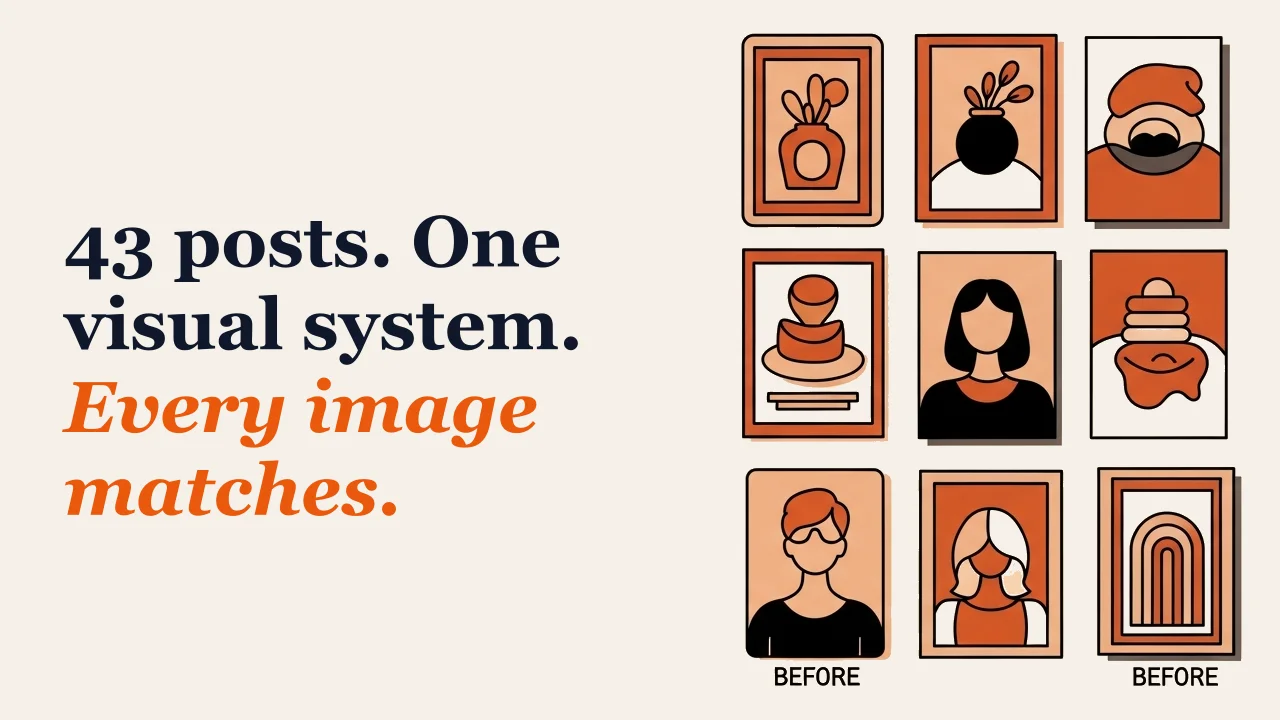
The Problem: 43 Posts, Zero Visual Consistency
Before I built the system, the KAIAK blog looked like 43 different blogs sharing a URL. Some posts had stock photos. Some had screenshots. Some had no image at all. A few had AI-generated illustrations that looked nothing like each other — different color palettes, different styles, different moods.
Individually, some of the images were fine. But scroll through the blog feed and the effect was chaos. There was no visual thread connecting one post to the next. No way to glance at an image and think “that’s KAIAK.”
Visual consistency matters more than individual image quality. A blog where every image is a 6/10 but they all match will feel more professional than a blog where images range from 4 to 9 but share nothing in common. Consistency signals intention. Randomness signals nobody’s in charge.
I fixed this in one weekend.
Choosing the Constraints: Why Fewer Options Produce Better Results
The most important design decision I made was not what to include. It was what to ban.
The Five-Color Palette
Every featured image uses only these colors:
- Orange — warm, not neon
- Terracotta — earthy, grounding
- Peach — soft accent
- Cream
#F5F0E8— background - Black — outlines only
No blues. No greens. No purples. No gradients. If an AI-generated image contained a cool color, it was wrong and needed to be regenerated.
This single constraint — warm colors only — created instant visual coherence across 43 images. You could shuffle them, arrange them in any order, and they’d look like a collection.
The Banned Elements List
AI image generators love visual cliches. Left unconstrained, they’ll fill every illustration with gears, lightbulbs, funnels, rockets, brains, and graduation caps. These are the clip-art of 2026.
My “never use” list:
- No gears or cogs
- No lightbulbs
- No funnels
- No rockets
- No brains
- No graduation caps
- No question marks or speech bubbles
- No cameras
Banning these forced the AI to generate more original visuals. Instead of a lightbulb for “innovation,” it might generate a compass. Instead of gears for “systems,” it might generate interlocking blocks. The constraints produce more creative output, not less.
The Composition Rule
Every image follows the same layout: illustration on the right (55%), text on the left (45%). Always. No exceptions.
This means I never have to think about composition. The illustration fills the right side. The hook text sits on the left. The layout is decided once and applied everywhere.
The People Rule
When illustrations include people: “abstract faceless silhouettes — circles and rectangles, no faces, no features.” This avoids the uncanny valley of AI-generated faces while keeping illustrations warm and human. The stylistic constraint became part of the KAIAK visual identity.
The Hook Text Formula: Magazine Covers, Not Blog Titles
The text overlay on each featured image is not the blog title. It’s something different — and more useful.
Hook text follows a two-line formula:
Line 1 (navy, bold, 72px): The setup. A statement, a statistic, a provocation. Line 2 (orange, italic, 72px): The punch. The payoff, the twist, the reason to click.
Examples from real posts:
94% of AI work goes undetected. The tools catch the innocent.
23 tabs. Cold coffee. 9pm. 15 minutes. All done.
The default voices sound like a GPS. $22 fixed that.
40 minutes. Messy notes. No designer. 60 seconds later: a deck.
Board meetings used to terrify me. One page fixed it.
These hooks do something a blog title can’t: they create emotional tension in two lines. The first line presents a problem or a surprising fact. The second line resolves it or twists it. Together, they function like a magazine cover — not explaining the article, but making you want to read it.
Writing Hook Text is an Editorial Exercise
I wrote all 43 hooks in one session, which forced me to distil each post down to its most compelling two-line pitch. Some posts were easy — they had a natural tension (“200 decisions before 10am / No wonder you’re fried”). Others were harder, and the difficulty revealed something: if I couldn’t write a compelling hook, the post itself might need a stronger angle.
The hook text system improved the blog posts themselves, not just the images.
Scaling the System: CSV + Script = Instant Consistency
Once the rules exist, execution becomes mechanical.
All hook text lives in a CSV file:
slug,hookText,hookHighlight,imagePath
ai-critical-thinking,"One-third of students are hooked.","The research is nuanced.","ai-critical-thinking.png"
ai-detection-arms-race-over,"94% of AI work goes undetected.","The tools catch the innocent.","ai-detection-arms-race-over.png"
Adding a new post to the visual system means adding one row to this file. The compositing script reads the CSV, generates every image, and outputs branded WebP files in under two minutes.
There are no design decisions per image. No “should this one be left-aligned?” No “what color should the text be?” No “does this illustration need more padding?” Everything is decided by the system.
This is the paradox of creative constraints: removing per-image creativity made the overall brand more creative and distinctive. When every image follows the same rules, the collection develops a visual identity that no individual image could achieve on its own.
The Results: What Consistent Branding Actually Looks Like
The transformation was immediate. The blog feed went from a collection of random posts to a recognizable brand. Scroll through and you see a wall of warm cream and orange, each image following the same composition, each hook text using the same typographic treatment.
The secondary benefit was unexpected. Because each featured image now carries a strong two-line hook, social shares became more compelling. When someone shares a post to LinkedIn or Twitter, the featured image — with its magazine-cover hook text — does the selling. It’s not a generic stock photo that says nothing. It’s a miniature advertisement for the post.
The images are also small. WebP at 85% quality produces files between 20-97 KB. Page load times didn’t suffer. Retina displays still look sharp. The technical choice reinforced the design choice.
What I’d Change Next Time
Start with the system, not the content. I wrote 43 blog posts first, then designed the visual system. If I’d built the system first, I would have written hook text alongside each post from the beginning. Retrofitting was possible but it would have been easier as a habit.
Test hook text at small sizes. Some hooks that looked great at 1280x720 were hard to read in a Twitter card preview or a mobile blog feed. Two short lines work better than two long ones for cross-platform readability.
The two-line format is non-negotiable. I tried three-line hooks early on. They crowded the canvas. I tried one-line hooks. They felt incomplete. Two lines — setup and punch — is the sweet spot.
The Principle: Systems Thinking Applied to Branding
This isn’t really about blog images. It’s about a principle: consistent output comes from consistent constraints, not consistent effort.
The system makes every image look like KAIAK not because I’m a designer (I’m not) and not because I spend time on each image (I don’t). It works because the rules are good and the rules are enforced by a script, not by willpower.
This is the same principle behind any effective operating system. Define the constraints once. Encode them into a process. Remove per-instance decisions. Let the system produce consistent output at scale.
If your blog, your social media, your reports, or your presentations look inconsistent, the problem isn’t talent. The problem is that you’re making fresh decisions every time instead of following a system. Define the rules. Write them down. Automate what you can. The consistency follows.
Need help designing a brand system and the automation to enforce it? My AI Systems Implementation program builds exactly this — your brand rules, your workflows, your templates, all documented and automated.

Want help building systems like this?
We help school leaders automate the chaos and get their time back.